

With the official release of Gemini 3.0 Pro, a large Google AI model, this week, the era of AI has ushered in a new milestone; Google, which was once decried, has returned to the center of the AI arms race stage.
Now you want to experience the power of Gemini 3.0? According to the latest summary of the situation, we have compiled nearly 20 channels of use in the four categories currently available for you to choose from.
1. Official channel: the most authentic experience
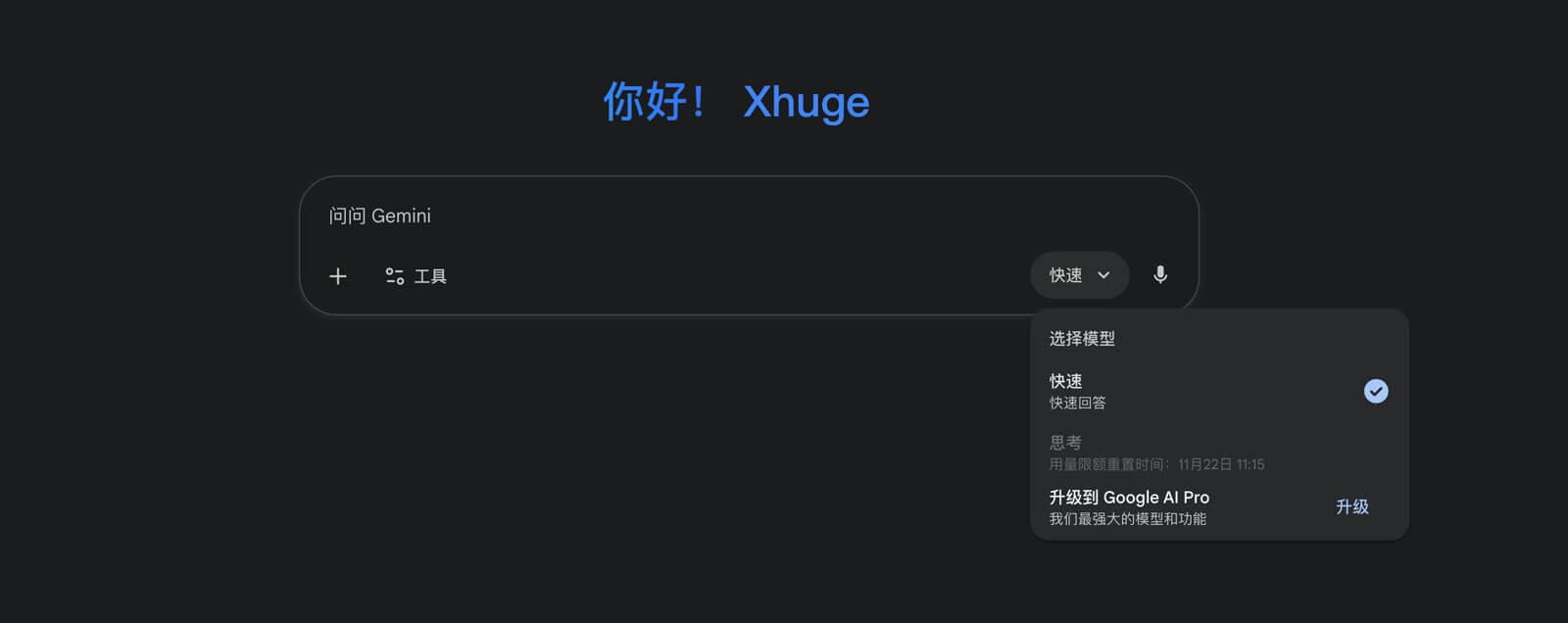
If you are pursuing the most official and direct experience, Google provides the following ”regular army" entrances:
- Google Gemini official website: It can be used with direct access.Tips: Adjust the mode to “Thinking” (thinking mode), You can call the Gemini 3.0 Pro model. If you are not subscribed,Thinking modeCan be used up to per day 5 pieces prompt.
- Google AI Studio: The official free development channel is suitable for debugging Prompt and obtaining API keys. Due to the current extremely high popularity, the output speed may be slightly slower.
- Google Antigravity: An AI IDE (sandboxed environment) launched by Google currently does not require a fee, supports a variety of models including Gemini 3.0 Pro, and supports all Win/Mac/Linux platforms.
- Mobile terminal and CLI: Access the Mobile Web version through a mobile browser, or use it in a terminal Google CLI Tools can be called directly.
2. Developer and IDE integration: an artifact for writing code
For programmers, to use Gemini 3.0 Pro, you can connect it to the editor. The following tools are currently supported:
- Cursor (popular recommendation):
- Setting method: “Disable custom API key” in the settings, and then manually add the custom model name
gemini-3-pro-previewReady to use.
- Setting method: “Disable custom API key” in the settings, and then manually add the custom model name
- VS Code: Microsoft's official VS Code and Google's official Code Assist plug-in can be directly called.
- AI native IDE: A new generation of smart editors such as Windsurf and Warp All are already supported.
- Open source Agent tool: Including Roo Code、Cline、Kilo Code And other immersive programming tools can be accessed.
3. Aggregation platform and API services: flexible call options
If you need API aggregation or enterprise-class services, you can choose from the following platforms:
- OpenRouter / ZenMux: A well-known large-model API aggregation platform that supports the distribution of Gemini 3.0. Among them, ZenMux direct connection is fast and stable, and there is currently a free quota.
- Vercel AI Cloud (v0. dev): Suitable for front-end UI generation and full-stack development.
- Vertex AI: Google Cloud's enterprise-level deployment service is suitable for company-level applications.
- Flowith / Make: Suitable for building nodal workflows and automated tasks.
4. Third-party clients and communities: a more friendly UI interface
For ordinary users who don't want to toss the configuration, there are also some third-party platforms that provide an ”out-of-the-box" experience.:
- Chatbots: Poe、Juchats (gathering Chat) and Dailigpt And other aggregation platforms have been launched, and some provide free trials.
- UI client: Chatbox、TypingMind、Youware Tools such as support for custom key access and have a more advanced UI interface.
summary
Gemini 3.0 Pro's access channels are already very rich. Easy to get started quickly, for different users, our recommendations are as follows:
| Target user | Recommended channels | Core advantages |
| Ordinary users/first-time early adopters | Google Gemini official Website (Thinking Mode) or Poe | The official is stable, the operation is simple, and the Poe experience is friendly. |
| Professional developer | Cursor or VS Code (Code Assist) | Deeply integrated development environment, programming efficiency has soared. |
| Advanced API users | Google AI Studio or OpenRouter / ZenMux | Free quota testing, flexible API aggregation and invocation. |
Comment List (0):
Load More Comments Loading. . .